I’ve been working on an Agent Playground that can answer moderately complex single-issue questions for me. Think “explain a topic to me” or “create a runbook for making a peanut butter sandwich,” or “prepare a list of awesome winter gifts that are retro-themed and cost less than $100.” Or maybe just “prep me for my next meeting.”
That means thinking about repeatable templates for problems I’d like LLM guidance on, but also shaped to produce consistent, measurable outcomes. Think of it as an applied AI question and answer format.
One of the key examples I’ve used to prototype is the concept of a company brief. Imagine you’re a salesperson or a customer success rep about to meet with a client, and you need a briefing to make you sound great.
Today, an agent just spent about ten minutes researching a company for me in a notebook tool on my laptop. It wrote a pretty good briefing, including source information, competitor, some public quarter numbers, and a short list of things it couldn’t confirm.
Then I wanted to send it to someone, and I was stuck.
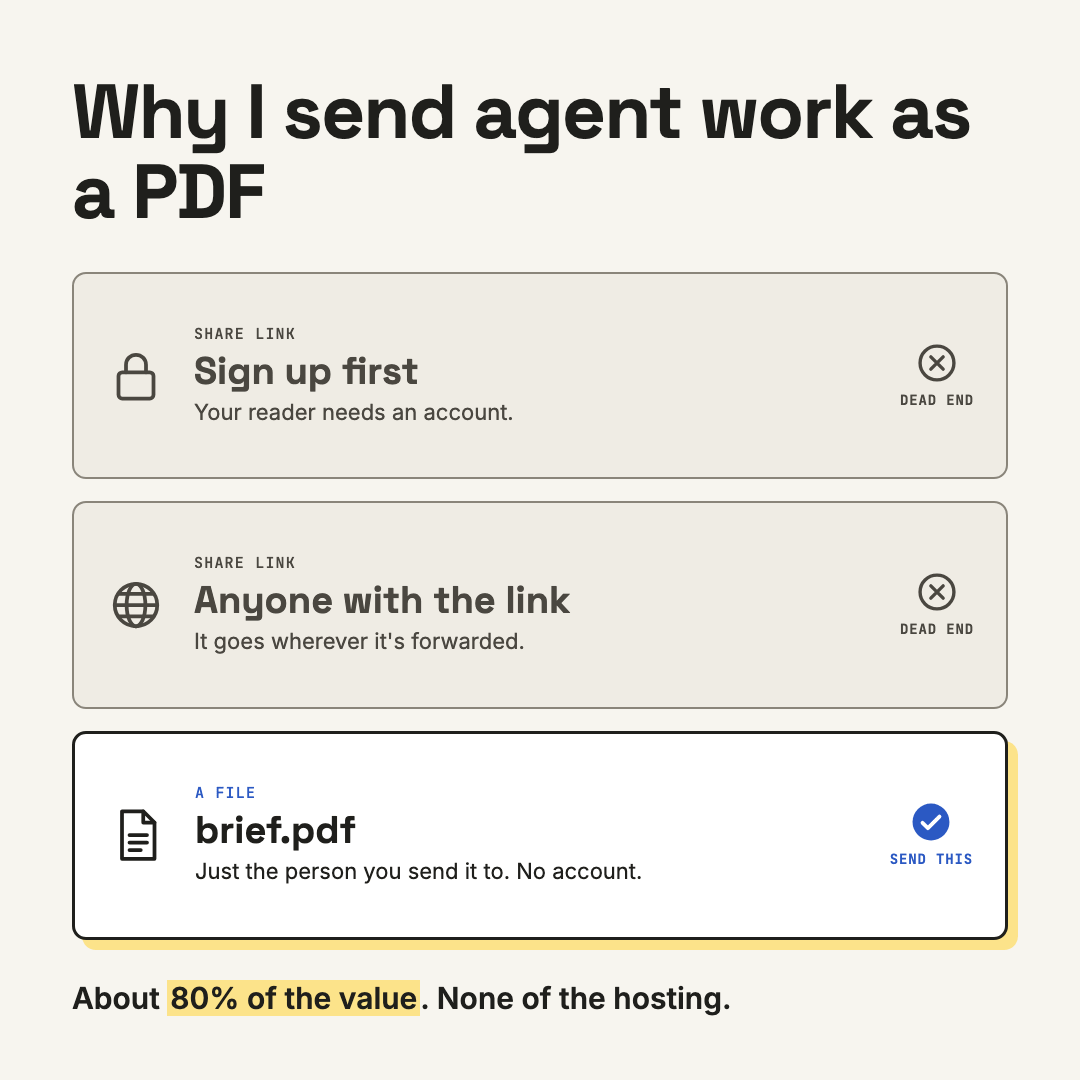
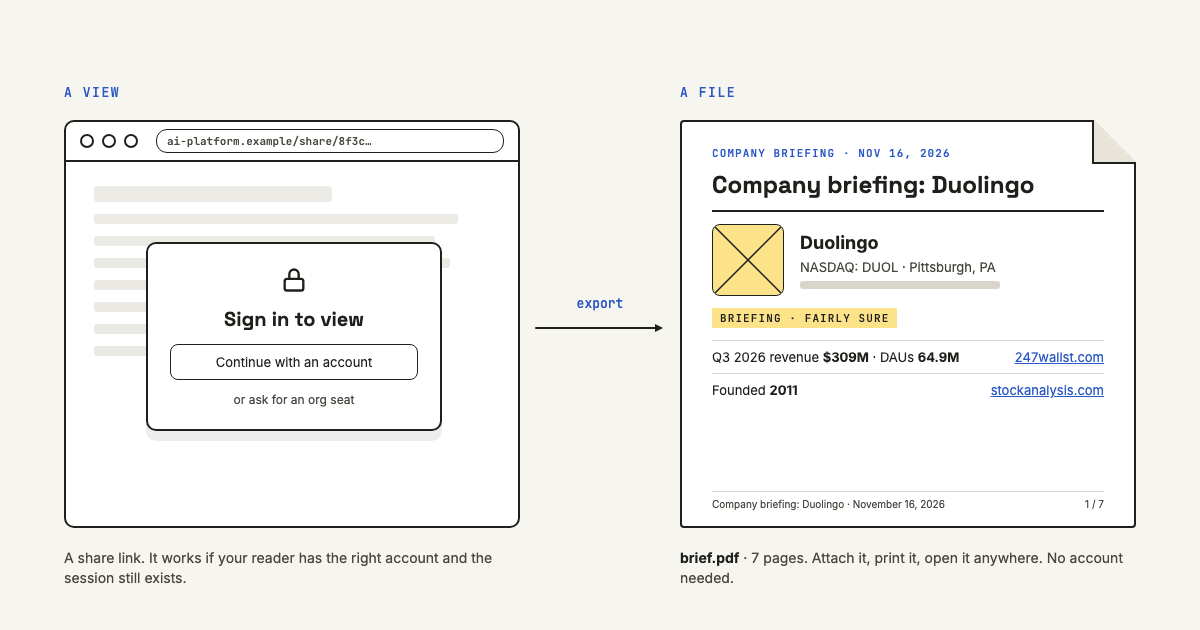
When I’m using Claude or ChatGPT, I can send them a link, with limits. Claude lets me invite one person by email, but only if they have a Claude account or make one first. A ChatGPT link has no per-person setting at all. You’re left with a public link that anyone can use to open your artifact. That’s no way to secure your research.
What I actually wanted to send was the notebook itself: the thing my reader could poke at, re-run, and ask follow-up questions about to gain more knowledge. But the recipient doesn’t have the laptop tool I used. So instead, I sent them a PDF.
I know, it’s very old technology used for printing (And ewww, a file). But wait a minute. A PDF has a snapshot of the html design I created, can be sent to exactly one person, needs no account to open, and doesn’t sit on a public URL. Portable means the reader can open it, trust it, and forward it without extra work.
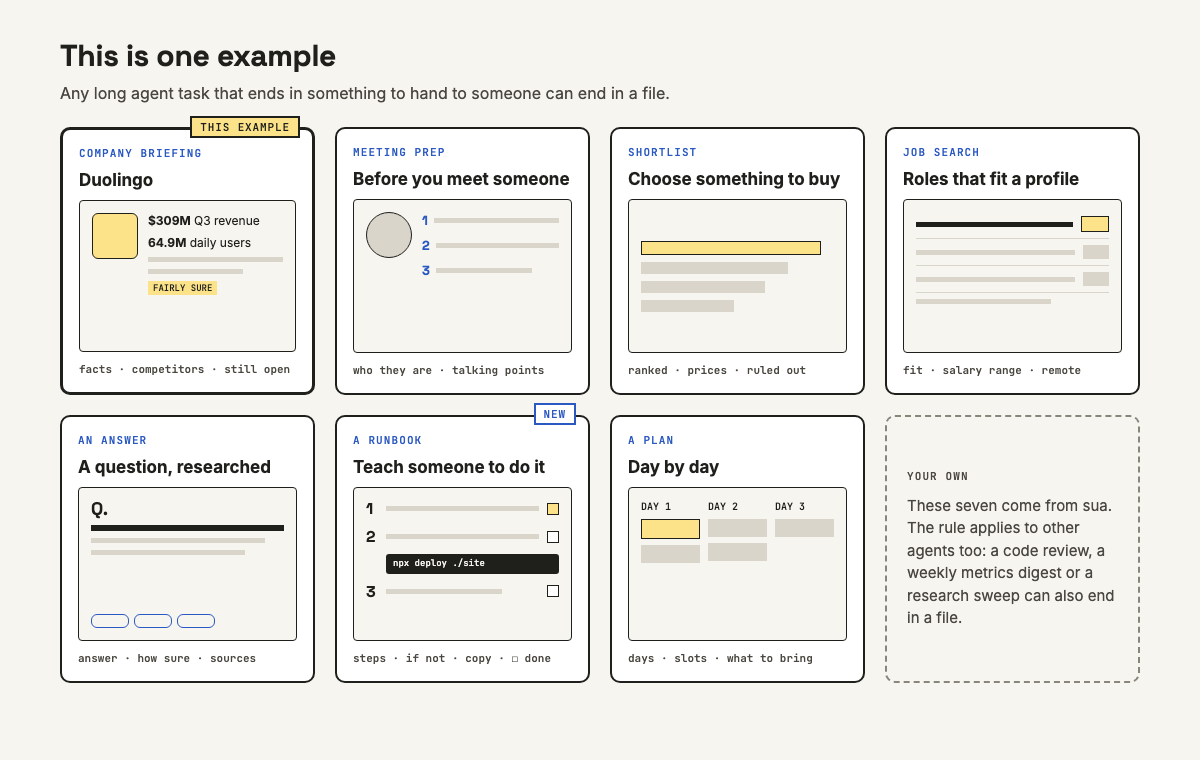
Your use case may differ from my example; you might want to send more than a meeting briefing.
Good news! That’s not the only shape these artifacts can take. You start by asking, “start a meeting briefing on the person I’m seeing Thursday,” “find me a used set of speakers at a fair price” or “teach me how to deploy my first web page,” and over MCP the app creates a prompt, asks you for confirmation, and starts a notebook from the right template.
What I’d send if hosting were free
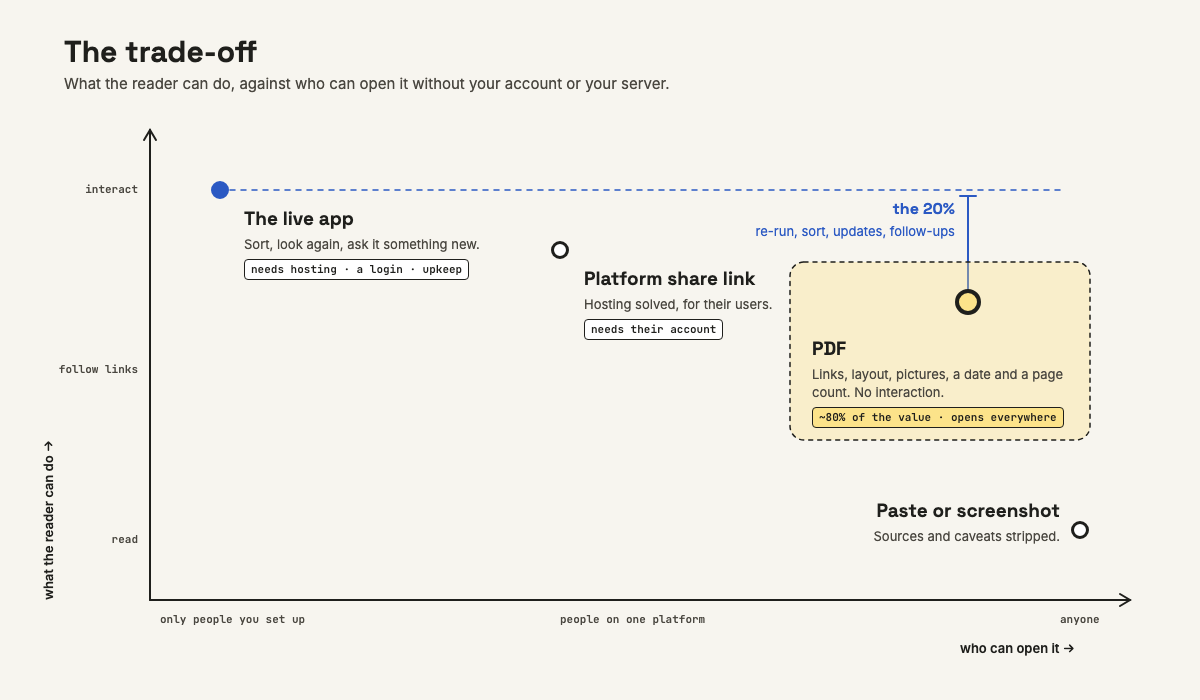
When you want to hand off agent work, you’ve got a few options…
- The live app is best. This is the ideal: you gets the notebook running where you are, you can chat with it and get updated answers from an LLM. But hosting an app is a host of design and security concerns (and potentially expensive, if you’re paying for API tokens).
- A platform share link is pretty good! Claude, ChatGPT and the rest solve hosting, but they are biased to favor people with accounts on their platform.
- A PDF is less interactive, but works everywhere. It opens in every inbox, on every phone and printer. It’s also only a point in time and doesn’t have interactive features.
- An HTML file is interactive, but hard to use. If you’re depending on interactive libraries or embedded files, it doesn’t work everywhere and can be large.
- A paste or a screenshot. Anyone can open them, but formatting varies.
The PDF sits at the useful corner so I’m using it to iterate through prototypes quickly. PDFs are a compromise because the reader can’t re-run anything, filter the table, or ask a follow-up. But because PDF is a near-universal standard, it carries about 80% of the value with none of the hosting.
Mix providers, keep the page
The app I built lets you combine multiple LLM models instead of using only Claude or ChatGPT, and then uses a flexible template to build the output. The PDF makes a pretty good abstraction (or proto-eval) because it reflects what you knew at a point in time.
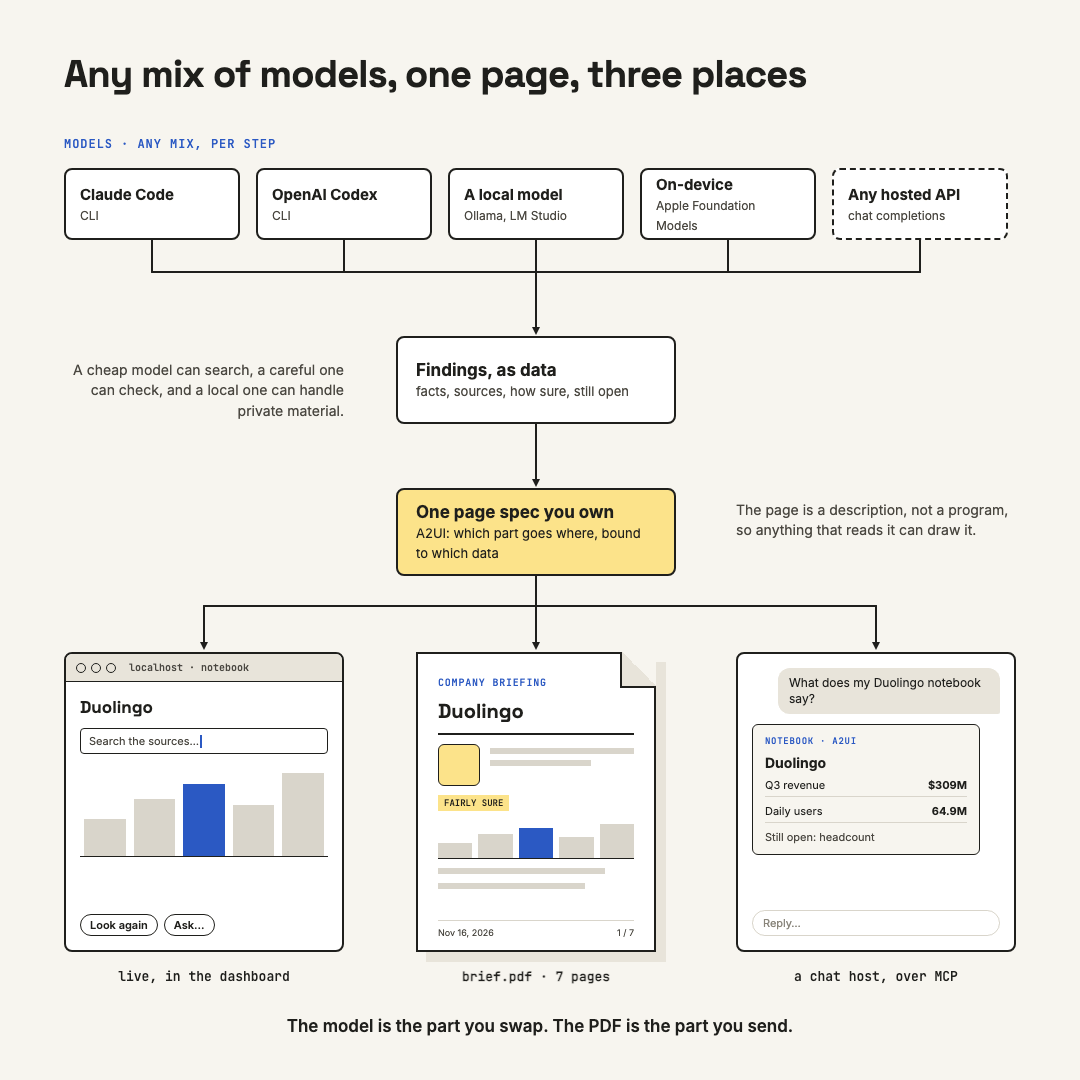
There’s also some interesting magic in how we’re building pages, using a Google-led technology called A2UI. This is a library that helps agents to describe a screen instead of building one: which parts parts go where and which data each part shows. Think of it as an order form to build something rather than carefully describing the exact outcome.
Three different things in this implementation can build using A2UI. The dashboard draws this information dynamically as it builds; the chat app (Inbox) draws A2UI inside a conversation thread, and we use A2UI to render the PDF that outputs into the print format.
That’s what design for the live version, ship the universal one looks like in practice
What survives the trip
Why use a PDF for an output? The easiest explanation is that it challenges you to build a stand-alone artifact that makes sense for a reader trying to answer a question. To consider it in the Jobs to be Done framework, “as a person needing an at-a-glance briefing about a company, I need a 1-3 page summary I can scan in a minute or two that gives me talking points.”
This is the first page of a company briefing on Duolingo, with annotations added.
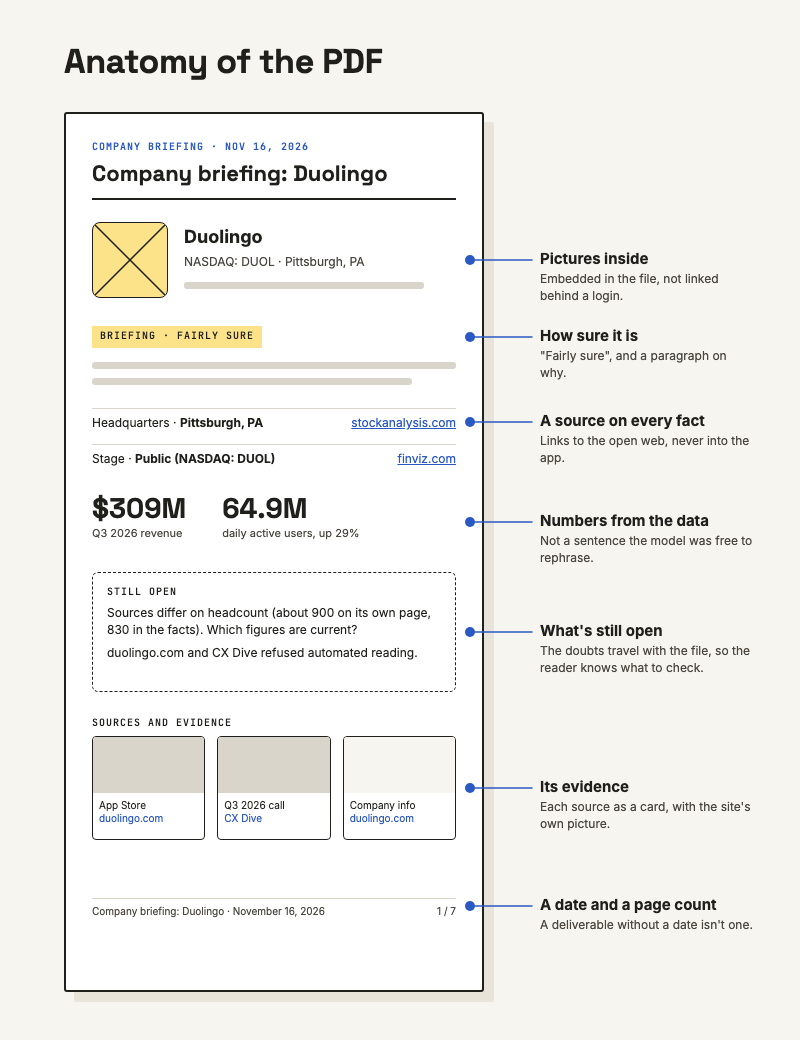
- Pictures inside. The logo and each source’s own image are embedded in the file
- How sure it is. Duolingo’s own pages agree with each other, but the checker couldn’t read duolingo.com directly, and it says so
- A source on every fact. Headquarters, stage and revenue each end in a link to the open web
- Numbers from the data. $309M in Q3 revenue and 64.9M daily users come from the notebook’s records
- What’s still open. A boxed list of what the agent couldn’t settle: “Sources differ on headcount (about 900 on its own page, 830 in the notebook’s facts)… Which figures are current?”
- Its evidence. Each source is a card with its site’s picture, so the reader can weigh it without clicking
- A date and a page count. Company briefing: Duolingo · November 16, 2026 · 1 / 7
To act on a brief, a reader needs to read it, check its sources, judge how sure it is, see what’s still open, pass it on, and ask it something.
It isn’t flawless. The brief gives revenue as $1.0B for 2024 in one place and 1.04B for FY2025 in another, and doesn’t flag the difference. But a careful reader can catch it, because the sources travel with the claims.
The 20% that we’re missing with a PDF is everything that moves and changes. In the live notebook I can click Look again, type into a box that searches the options as I go, watch a chart redraw when a price changes, or ask a follow-up in the notebook’s conversation.
The PDF is a render; the context is the asset
That afternoon I asked the app to look again at the same company. It didn’t start over. It built on what it had and updated what had changed. The notebook showed the difference, Size, 900 employees → 830 employees, and when I wanted the reader to see it too, I printed the version of the PDF that starts with what’s new.
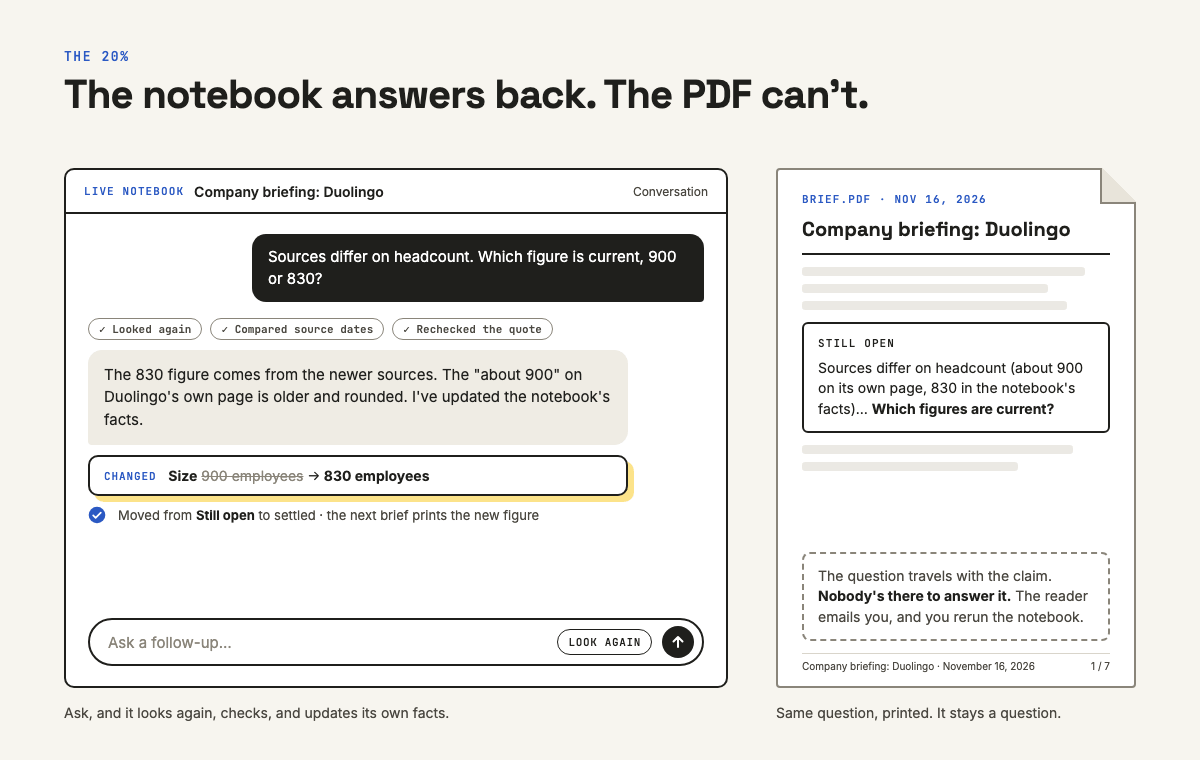
The PDF ends up being a point in time capture of the notebook, which is also useful if you want to see if it drifts (or if it’s different when running with different providers using the same question).
Where I keep the live version
If you want the app half too, that’s what I built some-useful-agents for. It’s free and MIT-licensed, and it runs on your laptop with the models you already pay for: Claude Code, Codex, a local model or any hosted API.
You start a notebook from its dashboard or from Claude Code over MCP. It learns the basics, finds sources, checks its own claims and writes it up, in steps you can watch and steer.
When it’s time to share, Download / share hands you the PDF (with or without what’s new), the HTML, a summary picture sized for LinkedIn or Slack, and the CSV.
What’s the takeaway? Someday our agent apps will run wherever your reader is, at no cost to you, and you’ll just send that. We’re not there yet. Until hosting is free, send the version your reader can open, trust and forward, and keep the live one for yourself.