If you have a comment or are interested in sponsoring, hit reply.
Integration in SaaS software is a hot topic. With the right connectors and experience, you can bring almost any data to your app.
One of the things I’ve learned about connecting systems is that the same mindset applies to real-world systems. Almost every solution is a little bit customized, and the key to building a proper integration is using the pieces you have while understanding the trade-offs you are making to achieve a solution that matches the requirements of the problem.
What do integrations require?
When thinking about connecting systems, you need to handle a few core items:
-
Authentication – can you prove who you say you are?
-
Authorization – given that you’ve proved who you are, what are you allowed to do?
-
Interfaces – how are you expected to request information, and how fast?
-
Payloads – what do you expect to get back?
-
Errors and retries – what happens when there is a problem?
In Saas software, this architecture is pretty well-known. Many modern products have published APIs that tell you how to authenticate against them, describe how you can call them, and specify the return information.
Building an integration usually requires more than just connecting the plumbing to create a good outcome. There is often (ok, almost always) more than one way to solve the problem, and understanding the constraints of your current situation and the intent of the solution goes a long way toward making an effective integration for the problem at hand.
This is also useful when troubleshooting real-world integrations.
A real-world integration example: retrofitting audio for an older gaming system
My experience with modern gaming systems is limited – I’m still waiting for the right moment to get a standup arcade machine with Ms. Pac-Man, Galaga, and a few other 80s classics.
Recently my son bought a used Sony PS3 and needed to solve an integration problem. The recommended integration for a PS3? Hook it up via HDMI to a television.
Getting video to the computer monitor through HDMI was relatively easy – connect an HDMI and you’re good! But in this case, we had a monitor with no external speakers and didn’t have Sony’s proprietary AV Multi-out cable, making this an interesting problem.
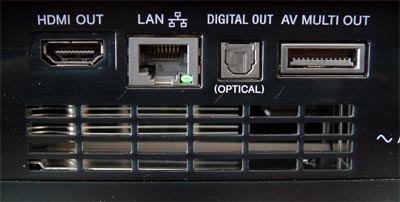
There are a few ways to solve the audio output issue.
-
Find a headphone jack on the monitor, use that as the AUX input for computer speakers
-
Use the AV multi-out cable(we didn’t have one) -
Use the digital out optical cable to connect to … something.
We didn’t have an A/V receiver with an optical-in port, but we did have … a very inexpensive Bluetooth speaker. Unless you have a TV soundbar hanging around, you probably don’t have a speaker (or a Bluetooth speaker) with optical input.
The Next Best Thing: An Integration Bridge
I did have this gizmo, from a previous project to take audio from an Apple TV and output it to a set of Bluetooth headphones.

This bridge is a Bluetooth transmitter/receiver that can take either a digital audio input or an Aux input and make it available via Bluetooth to a plain vanilla Bluetooth speaker.
It worked! From Craigslist purchase to gaming with digital audio in about 15 minutes.
What’s the takeaway? Real-world integration challenges often look in retrospect a lot like integration in Saas. Follow the basic rules (even if the “APIs” look a bit different) and you’ll be able to find quality solutions in the face of roadblocks.