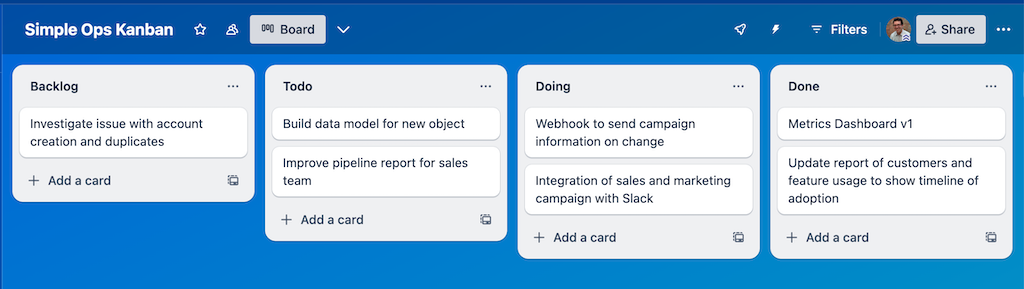
Even if you’ve never read about the history of Kanban, you’ve probably seen screens like the one above that divide a series of tasks (or a project, or a product) into stages of development easily reviewed by yourself or others.
It works like this: initial cards are created whenever new work is identified. The position of a card in a stack demonstrates the priority of that work – higher in the stack indicates more important work – and contains ideally enough information to evaluate that work card at the current stage of the progress funnel.
Each stack or list tells you something about the stage of the work to be done so that you can know more about the type of work contained there.
In a sample Ops Kanban, you might include:
-
Backlog – these are ideas that the team has suggested. Anything goes! If you want to have a filter for these, that’s ok too. The point is that it’s a catch-all for the things you think are worth doing but haven’t prioritized or evaluated in detail.
-
Todo – these items have passed the initial test for “it’s worth it to do these things.” Your mileage may vary, and I think of this as the “all things being equal, we would definitely do this” bucket. Cards that live here have a clear benefit for saving time, resolving an existing bug, expanding capability, or improving a process for the team. You can start prioritizing here, so the items at the top of your to-do list are the ones you’ll likely pick from when you need a new item for your doing list.
-
Doing – these are the things you’re actively working on right now. ⚠️ Be careful when you add items here before you finish others in this bucket because you probably can only work on a few things at a time. To add more items to this stack, you need to move them to Done.
-
Done – this is the stack of finished items, and really handy to remind you of the things you completed. Depending upon the granularity of your cards, you might have a lot of things in here, or not too many.
Tl;dr: the purpose of this organizing system is to force you to categorize your work and then limit how many items you take on at any one time.
Managing Kanban Capacity
Like any system, Kanbans are only as good as the practices and cadences you use to maintain it. Now this doesn’t mean you have to be a professional Agile practitioner, but it’s pretty good practice to look at the buckets and be intellectually honest at least once a week or a few times a month.
When you see items that you realize you’ll never do in the ToDo list, it’s ok to move them to the backlog or to archive them entirely. When things are lagging in the Doing list, you might separate a portion of the undone work and make a new card at the top of the ToDo stack. The point here is to keep the work manageable, transparent, and well-sized.
What amount of work fits in a card?
In an Ops Kanban board, details are everything. But each card doesn’t need to be a full-blown customer story or Product Requirements document. Cards need to have enough information to work on and should be more detailed as they get to the Doing stage.
Need a guideline? It’s probably not enough detail to write: “build a report for the sales team” but the card in the Kanban doesn’t need to enumerate every field and every filter in that report to be effective. The point of this tool is to provide information and transparency to the entire team and to build a framework to streamline and move work forward.
What’s the takeaway? An Ops Kanban board is a great tool for demonstrating the scope and breadth of ops teamwork, while also serving as a placeholder for tasks that aren’t yet well defined. Using a Kanban to manage the flow of work on a data team helps to see how long it will take to get things done and which items are on the critical path to delivering value.