What makes a perfect Slack message? No, I’m not talking about a dunk, reaction gif, or pranks like faking a typing indicator with a bot so that people are typing… appears constantly. I mean the practice of improving your communication so that people in your remote team see your messages more often, interpret and understand when you are asking for help or assistance, and get the context of the message.
Let’s talk about messaging to a public channel in Slack.
A great message is concise, actionable, clear, and easy to scan. The content stands out from a wall of text and informs your team how to read it and acknowledge, respond, or collaborate.
Breaking down core messaging elements
Public channels are noisy places: messages are easily lost in the stream of information. Keep it simple and readable, and you’ll get more feedback.
Here are a few axioms for creating great messages in a public channel.
Great messages are:
- Clear: they indicate the type and priority of the message at first glance
- Concise: they provide short, readable descriptions with minimal jargon
- Actionable: the next step or request for input is explicitly stated
- Contextual: there is enough context to answer or read the message, including links to resources
- Outcome-driven: they state the impact in neutral terms
This is not intended to be a one-size-fits-all list.
The intent here is to focus on the characteristics that make it easier for people to scan, acknowledge, act (if needed) and move on.
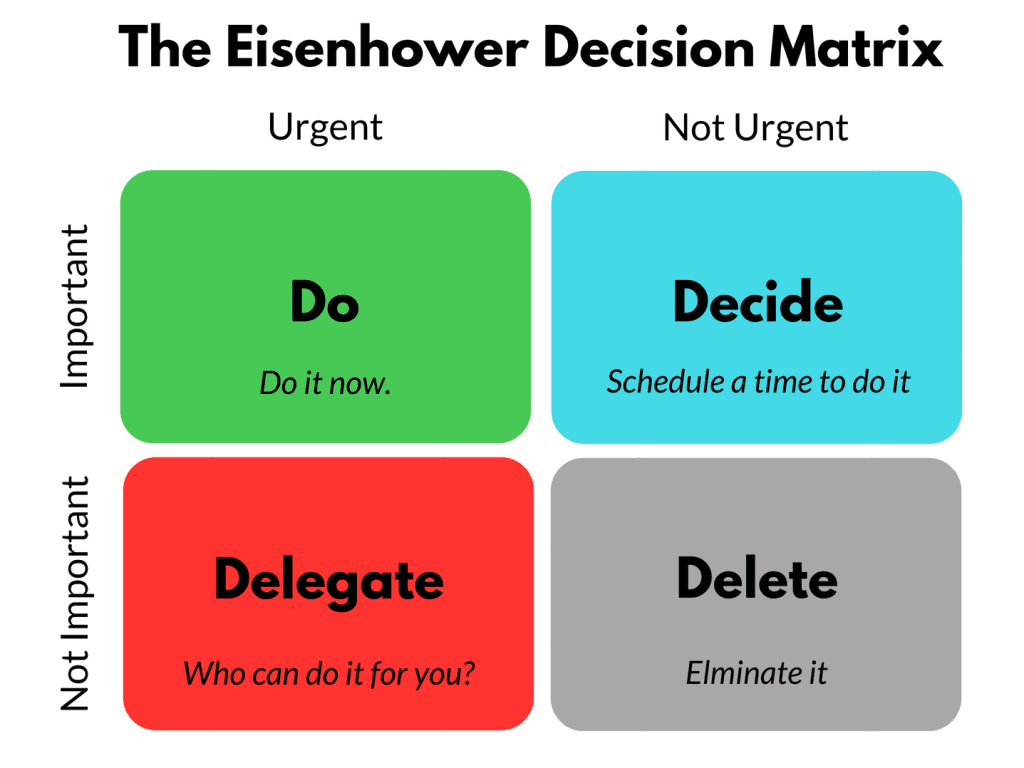
Winning this game means lowering the context switching needed to read your message and applying a heuristic like this decision matrix —> do I need to do or delegate something?
What does a great message look like?
Unsurprisingly for those of us who have ever worked in support and operations teams, a great message in Slack looks a lot like a great support ticket.
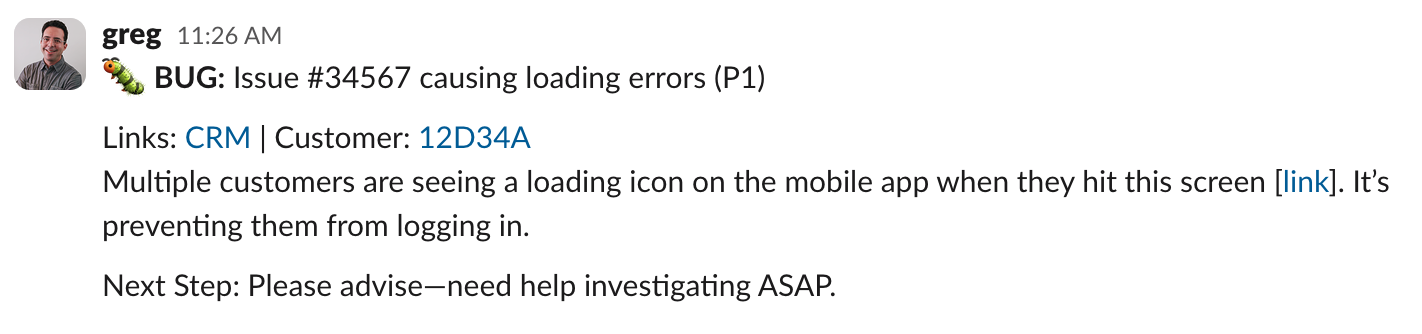
Here’s a hypothetical message using this template to demonstrate a breaking issue in a consumer application.
Why each part matters
- Emoji and type – this quickly lets team members know what type of problem it is and gives them a reference point to look it up on their own. Common other types might include ❓QUESTION or 💡 IDEA
- Title – a short, clear message helps the reader to know what this is about
- Priority – it is important to share how urgently you need help. In many organizations, P1 = URGENT, P2 = ACTION NEEDED, P3=LOG ONLY
- Relevant links – make it easy to jump directly to external resources needed to provide context like a CRM, Ticket management system, or a customer application record
- A brief description – don’t write a book; instead, think about a single sentence description that can be understood at a glance. If you need more context, link to additional docs
- Next step – lets the team know how they can help
The more often you model this pattern, the more likely the team will pick it up and emulate it. The format doesn’t need to be perfect —> the point here is to embrace kaizen (continuous improvement) and to build a way of communicating that works better for a distributed team.
Yes, this helps everyone
There will be some pushback (gentle and otherwise) from people who don’t like a strongly typed messaging system.
How can you respond?
I’d remind them that a standard reduces confusion because everyone sees what’s needed. I’d also say: we’re doing this as a team because it saves time and improves the ability to answer team questions.
Clear asks tend to get quicker and more complete responses.
It’s not just about getting a fast response, but also an effective one. A strongly typed question and answer set makes it easy to scan and analyze the content in a public channel. It also clears the way for future analysis with LLM tools.
What’s the takeaway? Everyone benefits from a clear ask. Adopting a standard for Slack messages by putting the bottom line up front makes it easier for the team to scan, analyze, and respond more effectively. It’s also a way to build visual continuity in your team’s Slack channels and avoid the “wall of text”.