For about four years now, I’ve been asking my computer to tell me dad jokes.
Not constantly. Every eighteen months or so, when some new tool or paradigm catches my eye, I sit down and rebuild the same little thing I built the last time. The API is always icanhazdadjoke. The output is always a groaner. What changes is the scaffolding around it — and, more honestly, what changes is me.
This started by accident. In 2022 I wanted to see if Google Sheets could pull data from a URL, and “a dad joke” was the simplest thing I could think of to fetch. I’ve been repeating the experiment ever since. Five stacks later, I’ve realized the joke isn’t the project. The joke is the instrument I measure the project with.
Why dad jokes?
Three reasons the silliest possible use case has turned out to be my most useful one.
It’s fun. Fun matters more than people admit. Learning a new tool is mostly getting stuck, and getting stuck is a lot easier to tolerate when the payoff on the other side is “my laptop told me a dumb joke.” Fun is what carries you past the first compile error to the second.
I know what output I’m going to get. One punchline. One string. Any environment — a spreadsheet cell, a browser tab, a Slack DM, a terminal — either shows me a joke or it doesn’t. That makes “is it working?” trivial to answer, which means the only real variable in the experiment is the tool.
It keeps me current. Because the target is fixed, whatever is new in the stack shows up as a contrast. What’s easy now that used to be hard? What still needs scaffolding? The dad joke is a tuning fork. I strike it against each new instrument to hear how that instrument actually sounds.
Four years, five stacks
Here is the same request, told five ways.
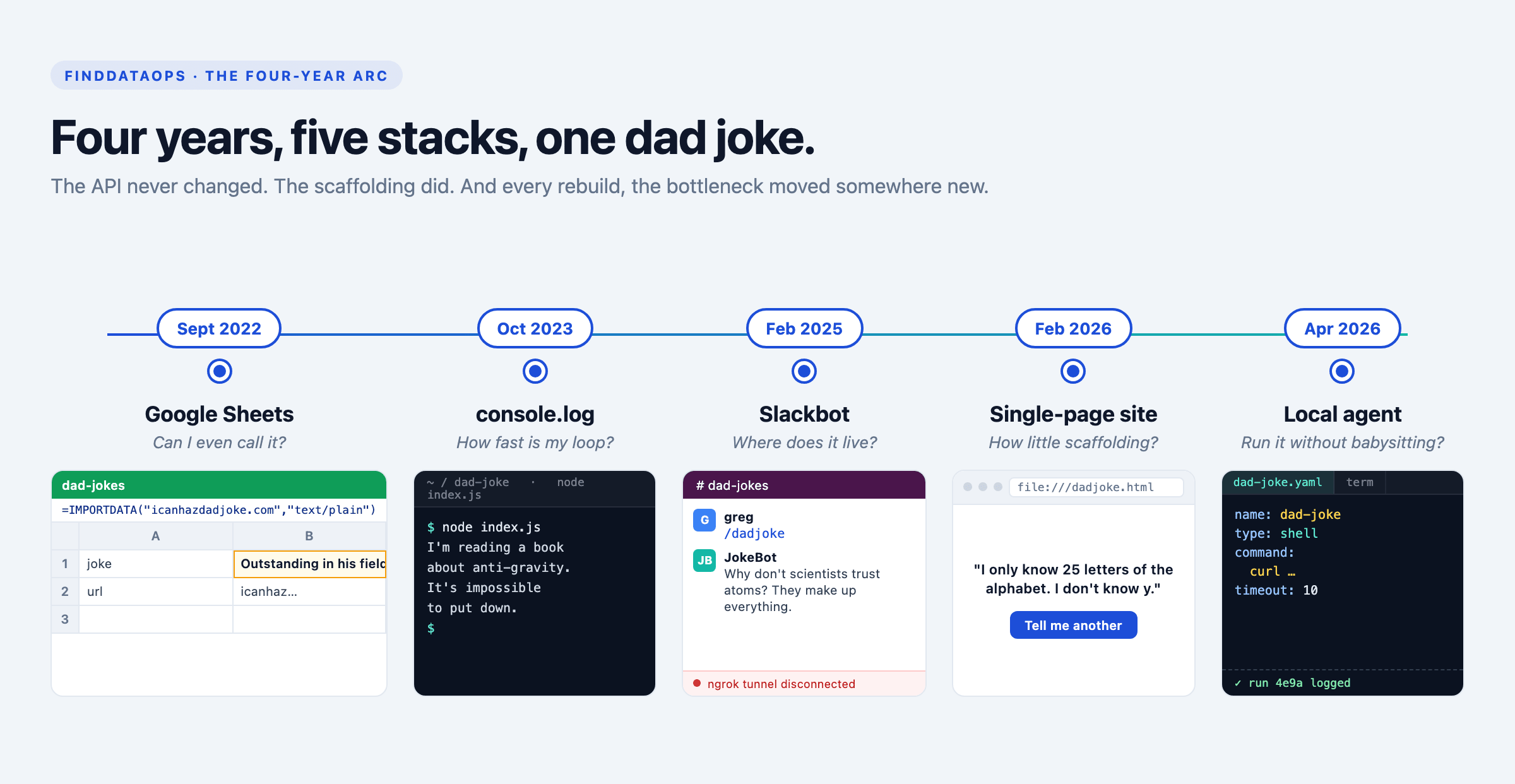
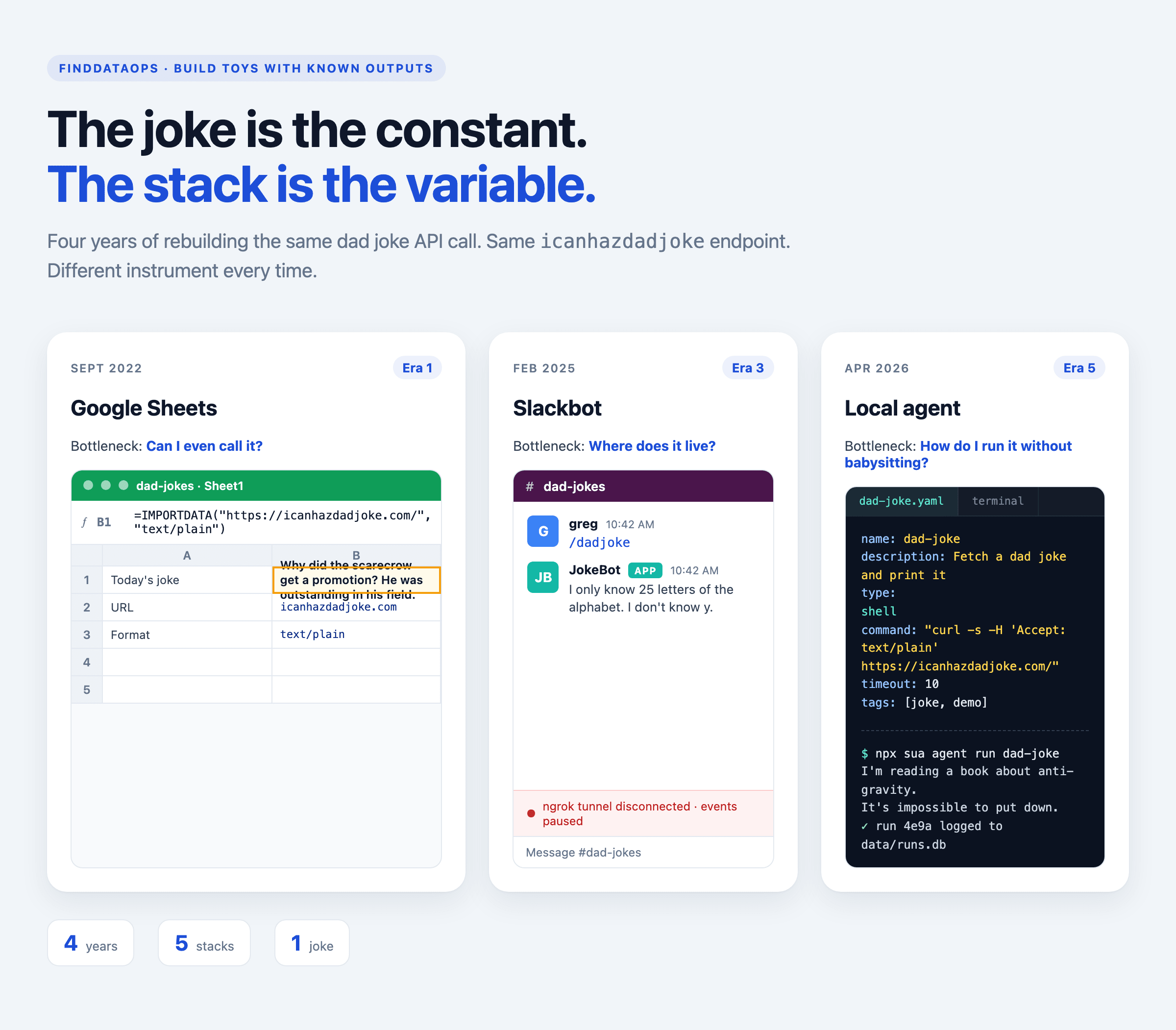
Sept 2022 — Google Sheets. =IMPORTDATA into a cell, with the Accept header hack to get JSON back as text. I wrote about it in How do you ask Google Sheets to tell a dad joke?. What the joke taught me: spreadsheets are a lot more programmable than I’d given them credit for, if you’re willing to accept that the “program” lives in a cell reference.
Oct 2023 — console.log. Node script, fetch, print to the terminal. See An ode to console.log. What it taught me: when the feedback loop shrinks to a single keystroke, you stop planning and start iterating. The joke showed up in under a second, and I suddenly remembered why I liked programming.
Feb 2025 — Slackbot. An event-driven bot that answered /dadjoke in a channel, which I wrote up in Adventures in building a Slack bot. What it taught me: the hard part of a bot is never the request. It’s tokens, webhooks, deployment, and “who owns the ngrok tunnel?” The joke was the easiest 5% of the project.
Feb 2026 — single-page web site. One HTML file, fetch on page load, a button to re-roll. See Start with a single-page web site. What it taught me: in the AI era, a single page is enough product to test an idea. You don’t need a framework. You don’t need a build step. You need a file and a browser.
Apr 2026 — an agent. Which is where this post ends up, and where the rest of it goes.
Why ask the same question?
Keeping the dad joke API at the forefront of my exploring makes it easier to build new technology as I am goofing off. In the course of different versions I’ve gone beyond “can I hit an API” to “what sort of APIs would work with this” and “where can I make this useful”?
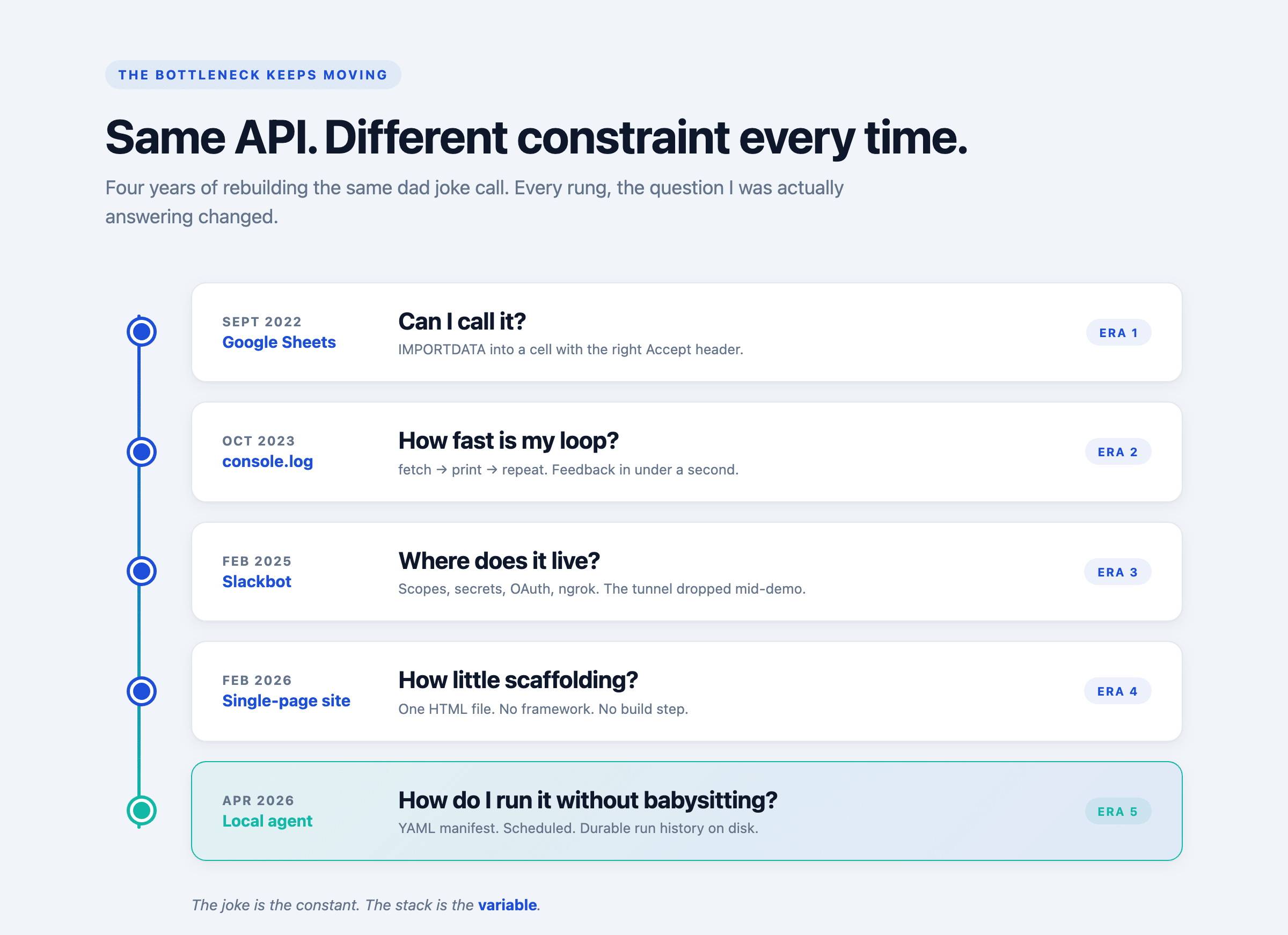
Each iteration teaches me more about building software and gives me product decisions to make while also giving me the opportunity to iterate in a new medium.
As a product manager building applied AI, the best way to learn about the pros and cons of building Agents is to create a scaffold for teams or individuals to create their own Agents. Building the next generation of software demands an agentic approach, so there’s no time like the present to start experimenting.
Why an agent, and why local
I’ve been using Claude and Codex daily, and the thing I keep running into is this: I want them doing work for me without keeping them running all the time.
I don’t want a long-lived chat window. I want small, cheap, scheduled jobs that wake up, do a thing, write a result somewhere, and go back to sleep. An agent for the morning commute. An agent to summarize yesterday’s commits. An agent — yes — to send me a dad joke at 8am.
That’s a framework, not a process. And once I sketched what it needed, the list was short:
-
A CLI to author and run things.
-
A manifest — a declarative file that says what an agent does.
-
A scheduler so I don’t have to babysit.
-
An orchestrator for retries, durability, and history.
-
A store so I can see what ran and what happened.
That list is why I built some-useful-agents, a way to set up little helpers on your computer that do small jobs for you. These could look like “every morning at 9, fetch me a dad joke” or “summarize today’s emails.”
You describe what you want in plain text, and the helper runs it for you: once, on a schedule, or as a chain of steps. Think of it like a recipe book of tiny assistants you can collect, share, and run whenever. It can also talk to Claude or Codex and get more context.
A full tour of some-useful-agents
The CLI is called sua. The quick start is two commands:
npx sua init
npx sua agent run dad-joke
Agents are YAML. Here’s the dad joke agent:
name: dad-joke
description: Fetch a dad joke and print it
type: shell
command: "curl -s -H 'Accept: text/plain' https://icanhazdadjoke.com/"
timeout: 10
author: gregmeyer
version: "1.0.0"
tags: [joke, demo]
That file is the whole agent. The manifest is the contract: name, what type of thing it is (shell or claude), what to run, and some metadata. You can point at a shell command or a Claude Code prompt. One schema, two worlds.
Underneath, there are two execution providers. The local provider runs the agent in-process — good for development and one-offs. The Temporal provider hands it off to a real workflow engine, which gives you retries, history, and scheduling for free. Temporal itself runs in Docker (docker compose up -d), but the worker runs on your host. That split matters: the worker needs access to your shell and your claude CLI, and those don’t belong in a container.
Every run — local or Temporal — gets written to a SQLite store at data/runs.db, so there’s a durable record of what ran, when, and what it returned. A small Express dashboard on :3000 renders that store as HTML for when you want to browse it in a browser instead of a terminal.
And because all of this is addressable from code, there’s also an MCP server so Claude itself can list and run agents as tools. The dad joke agent becomes something Claude can call.
Architecture diagram and full schema are in the README. The short version: YAML in, run record out, scheduled or on-demand, local or durable, your choice.
Why do this?
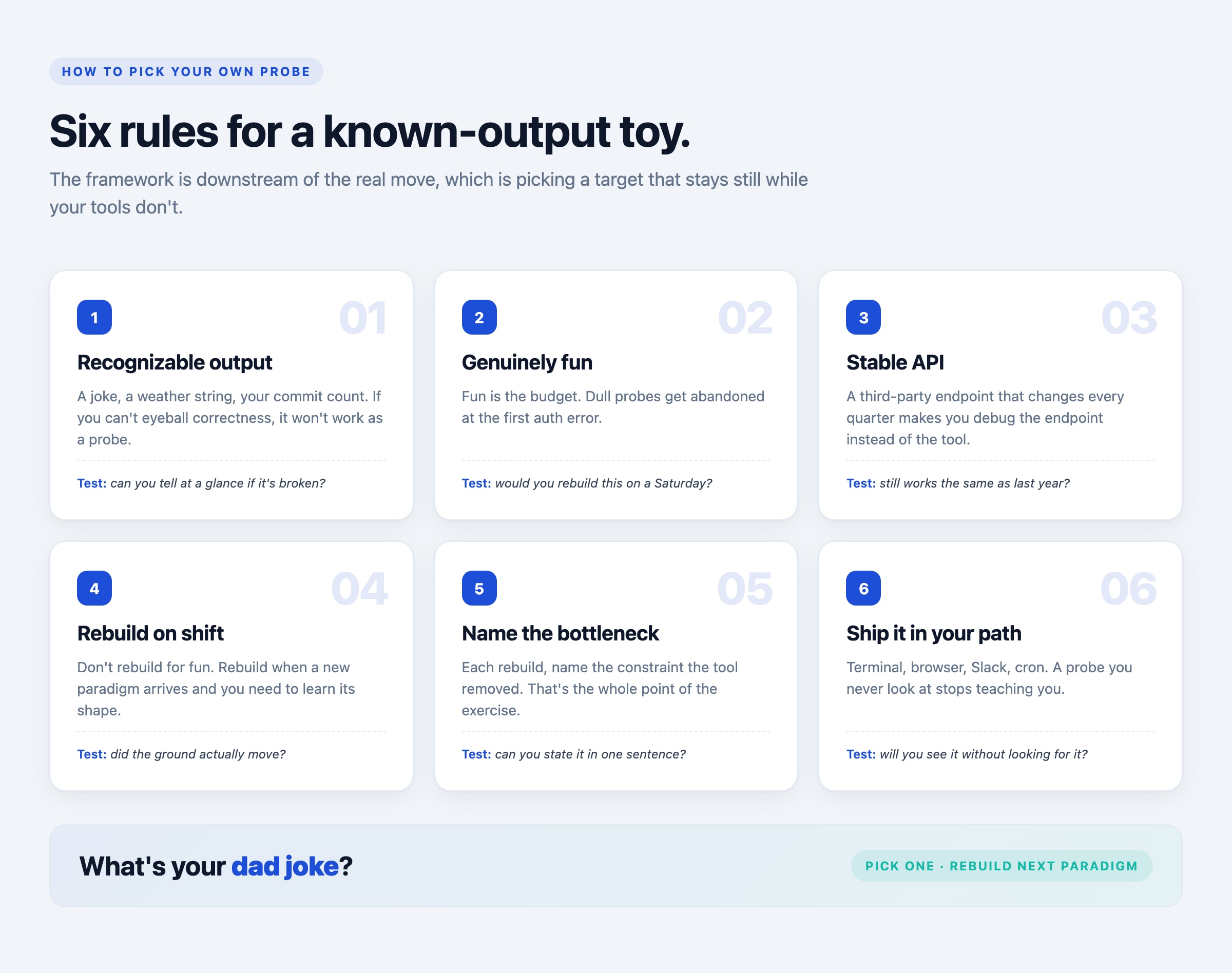
Pick a toy with a known output. Something silly enough that you’ll actually finish it, and small enough that “is it working?” is a yes-or-no question. Then rebuild it every time the ground shifts under you. You will learn the new tool faster than any tutorial, because the only thing varying in the experiment is you.
My next rung is already obvious. The agent fetches a joke. The next step is chaining it — a pipeline that grabs a joke, runs it through Claude for a rewrite, and posts it to Slack on a cron. Same joke. Same API. New stack. And now that this is a more than a toy, I need to make sure it’s secure, so that’s the next stack to learn about.
What’s the takeaway? Focusing on the same problem over and over is a great way to continue a lifelong learning loop. When you fix one variable in your exploration, it makes it easier to learn the scary new thing you haven’t figured out yet. And Dad Jokes are fun!