Every GTM team knows the pain of process documentation. It’s that necessary evil that eats up valuable time, rarely gets updated, and often fails to capture the nuance of real-world operations.
In 2023, I started experimenting with AI to solve this problem, beginning with a simple approach to building process diagrams.
The idea was straightforward: if we could structure the diagram well enough, we could use AI to improve and document it using Mermaid for visualization.
Fast forward to 2025, and what started as an experiment has evolved into something much more powerful.
Let’s look at a workflow every GTM team faces: the Lead to Account matching process. This critical workflow matches a web form submission with an account creation in your CRM (in our case, Salesforce).
In 2023, building this workflow was possible as a chat experience in ChatGPT. Today, I’ve built an interactive tool in Python that interviews you, improves the process, and documents the results. It can also load archived processes into the system.
I’m not a full-stack engineer, so how did I do this? Yep, used the magic of AI.
A caveat: remember, this is not magic. We are using AI to speed-run code generation using established patterns. That means it doesn’t get everything right. You still need to establish the logic, give it guardrails, and make sure it works. That being said, it’s fast fast fast to build.
A Lead-to-Account Matching Example
When I built this example in 2023, I had ChatGPT store the results of the conversation about a process in a .csv file. This seemed like the best way to store and then read information for a process flow into ChatGPT. After each process step, the user identified optional notes and pointed to the next logical step of the process.
The structure for this .csv file looked like this:
- We wrote a row for each step in the process
- Each row contained a description of that step
- Each row also contained a description of what happens next, and a failure condition with a next step
- There was a separate file containing optional notes for the step.
If you weren’t experienced in process design, this was a relatively static process. We fed ChatGPT some information, asked it to improve the steps, and then regurgitated the same information as a Mermaid diagram.
At the time, we wrote:
What’s cool about this? We started by having a conversation with ChatGPT to understand an existing process and improve it. We ended with a generalized process to learn about a process, document its steps, create a stylized diagram, and improve that process.
Is this a replacement for a person who builds processes? Absolutely not. But it is a toolkit for anyone who builds process and needs to update that process frequently. Using AI as a process copilot will make your diagrams and your process better.
For 2023, this was pretty cool! It used the ChatGPT consumer product and was limited to the available responses from whatever model you selected.
Where we’re going, we don’t need (AI-powered) roads
Things have gotten weird. In 2025, we can literally “vibe code” a tool to build the process builder and the documentation. Building a Python tool that creates the interview, improves the process, and writes documentation was a neat next-level challenge.
What’s is the new plan? Use AI tools to build a script that would interview you (or read in an existing process), send the steps to OpenAI to improve, and then produce a variety of outputs to document the process:
- A document that demonstrates the exact steps
- A Mermaid chart diagram to share with your team
- An executive summary that’s easy to import into Google Docs
The results? Mind. Blown.
The tool I built is not just a documentation exercise. It’s an AI-powered system that helps us think through, refine, and continuously improve our processes. (Yes, super meta.)
As with most software, the initial “hack together and run” process took only a few hours, and I’m still refining the result. But it’s much more interesting than what we did in 2023.
If you’d like to try it out yourself, find the repo on GitHub here.
Is this code good?
Nope, it definitely needs to be improved and rebuilt. But for a weekend project, it’s a great start to think about the prototype and consider how it could be done when done correctly.
What would I do next time?
Write a technical spec first to think through the issues and derisk the outcome. In this case, I naively thought I had nailed it by having the prior conversation. But scope crept in 😉
If you want to learn more, keep reading!
The Tech-stack to duplicate this process
What do you need to make this happen?
We used two primary tools:
- Cursor: An AI-powered coding assistant
- Warp: An AI-powered terminal that enhanced our workflow
Both of these tools are solid at tasks like:
- Taking natural language and translating it to well-formed Python code
- Managing file operations and directory structures
- Running the Mermaid CLI to generate diagrams
- Handling version control operations
- Providing intelligent command suggestions
- Automating repetitive tasks
The real power comes from how these tools work together.
For example:
- Cursor helps us write and refine the code with some strict rules
- Warp helps us organize and improve the output
- And the cycle continues…
You don’t have to use these tools in tandem. Because they work differently, switching back and forth between them while editing files produces some novel results.
Note: You get novel bugs when both editors try to grab a file to make changes, so don’t make changes in both tools at the same time.
Directed collaboration creates a virtuous cycle where:
- Each tool enhances the capabilities of the others
- The AI assistants learn from our interactions
- The process becomes more efficient over time
- The quality of the output improves with each iteration
The Process Builder in Action
Let’s see how this works in practice.
Nope, this is not an MVP (yet). What you can get to in a few hours is pretty amazing.
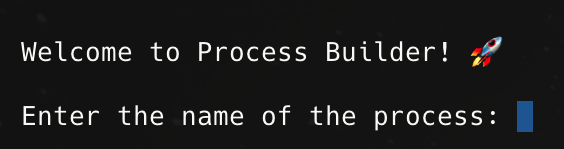
The tool starts with a simple interview, where we interview the user about what happens next.
AI-Powered Step Evaluation
In the new iteration of the process builder, we go through an iterative process where we first:
- Ask the user for a process step
- Optionally suggest how to make it better
- Ask for the next action on a success or failure
- And include any error conditions, validation rules, or notes
- At each point in this interview, it’s possible to get an AI suggestion
And then go on to the next step, until we reach the End.
It’s possible to link steps to one another and create a simple logical chain of “first this happens, and then that”.
When you’ve finished the process, the tool creates documentation for you.
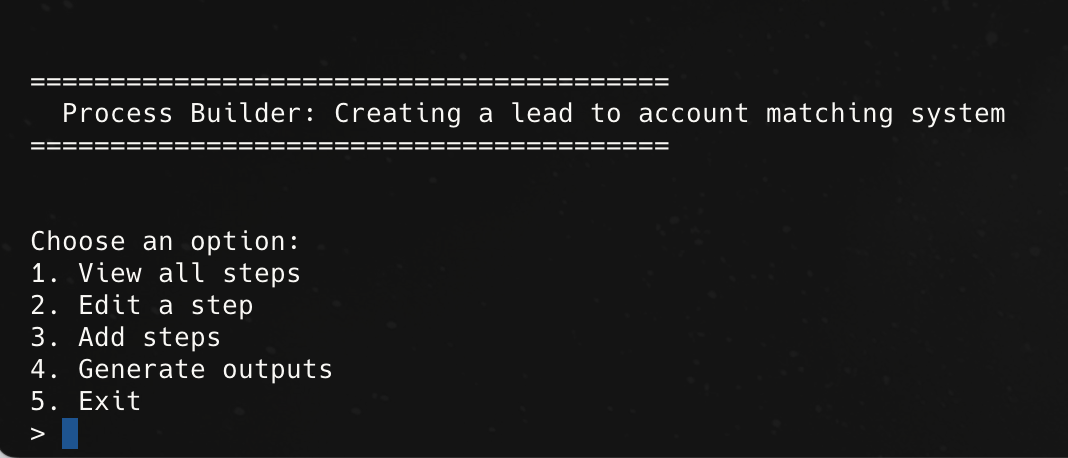
Getting Stuck: the tool doesn’t “get” process design, so you need to help
Discussing software design with an AI process can be confusing. It helps to have a tight plan for action so the “decisions” initially required for the AI tools are limited.
Both of these tools let you have a natural language chat with an Agent to refine the code while it’s in process, and they each have their strengths:
- Cursor is primarily a code editor is skilled at overall design and following your instructions. It is amazing if you know exactly what to do (add some Cursor rules to keep it on track). Occasionally it will get lost and needs you to prune code or redirect the output.
- Warp is primarily a custom terminal, though it also can edit your code to accomplish broad goals. Because it’s able to build a plan for action, it can be better to work through complex issues and iteratively fix bugs.
- Both of these tools will operate relatively autonomously if you’d like to let them do that.
Neither Cursor nor Warp is a perfect solution. Yet they both feel like a dramatic leap forward in building everyday software. Instead of getting hung up on syntax errors and not understanding how to try a new library or idea, have a conversation and learn how the code works.
What features did I build and why?
If you can build any features, why build a process mapper in a stepwise design based on an interview? In my experience, this is how many people think about process design.
You literally “walk” with a record through a decision to understand whether it passes or fails a condition, then think out loud where it should go next, identify the trigger for a next action, and document any possible error steps.
Building a diagram for this (thanks Mermaid!) helps visually orient the reader and provides needed context.
Based on this real-world experience, that means you need:
- A static list of steps to tell you a standard operating procedure and how to use those steps as a “runbook”
- A diagram for visual learners to help them contextualize the process
- And an executive summary for anyone who wants to know the “why” we’re doing this without a high level of “in the weeds” detail.
This Process Builder tool isn’t just another documentation tool – it’s a conversation partner that helps you think through your process design.
When you start using it, you’ll notice how it’s almost like having an experienced process designer sitting with you. We want to do more than collect information; we want to help you structure your thoughts and identify potential improvements.
The tool combines AI-powered insights with practical process design experience. The goal is to build better processes from the ground up.
Applying these lessons back to process design
The real magic of the Process Builder tool isn’t in any single feature. Instead of treating documentation as a one-time task or a necessary evil, it turns it into an ongoing conversation about how to improve. The tool helps you capture the process, why it works the way it does, and how it could be improved.
This approach transforms process documentation from a static, error-prone task into a dynamic, iterative process that continuously improves through AI-powered feedback and validation. The result is a more robust, maintainable, and compliant process definition that serves technical and business needs.
What’s the takeaway? The key insight is that we’re not just using AI tools – we’re creating a directed collaboration system where each tool plays a specific role in the development and documentation process. This approach could be applied to any complex development task, not just process documentation.