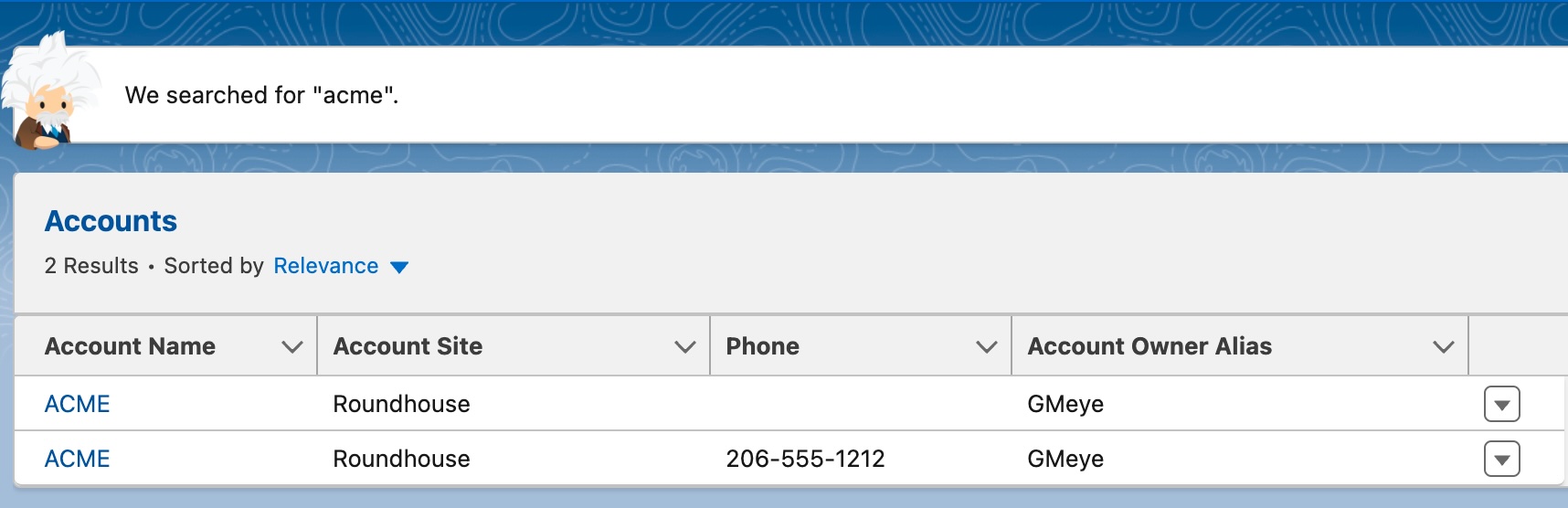
“Any person on the team could look at these two accounts and see that they are the same.”
If you’ve worked in Operations for any length of time, you’ve had this conversation about an account, contact, or some other record in your CRM.
Duplicate records are annoying. They can cause confusion, conflict, and misdirection. They are also remarkably resistant and show up in many different configurations when you let your prospects and customers sign up in a low-friction environment.
Why do duplicates happen?
Computers are dumb. They will do what you tell them to do.
A duplicate is a record that is sufficiently similar to an existing record that it causes confusion when the records are seen side by side.
For company records, duplicates are usually resolved by a combination of fields like name, website, and location. There might be another key (like an external or application ID) that creates other kinds of relationships.
For people records, you might see a name and email combination, with additional keys like an application ID.
That description is where the simplicity of duplicates often ends.
How do you avoid creating duplicates?
When new records are created in your systems, there’s probably some method of determining duplicates by name or name and website.
As more GTM systems are connected, the potential for duplicates in your systems increases, unless you always create new accounts in exactly the same way and there is only ever one way to create an account.
To find a duplicate (account) programmatically, you need:
-
Criteria for determining a duplicate – this is logic that will tell you a pair (or group) of records have matching terms that create a record that needs to be resolved or remediated
-
Tie-breaking rules – when you have two or more duplicate records, how do you know which record wins? You need a series of rules to go through sequentially that result in only one winning record
-
Instructions to distribute the data by record or field – when you have a winning record, do you keep all of its fields? Do you create an amalgam of the best fields from all records? Do you select the oldest value? Do you select the value a customer or prospect entered?
It’s complicated to solve duplicates. It doesn’t have to be excessively complicated, but you do need a series of rules to resolve and remediate the duplicates so your team doesn’t get confused.
What do you do when you have duplicates?
There are three typical scenarios for duplicate records once they are created and move downstream in a system. The best case scenario is to avoid creating them in the first place, but they usually show up like this.
An obvious duplicate
These are the easiest to fix, and look like exact duplicates of an existing record. Perhaps a salesperson took a call with a prospect and created an account before searching whether the account existed. Perhaps there is a loophole in your demo process that allows a prospect to sign up for a demo and a trial account using the exact same name and email address.
When this happens, the easiest thing to do is to mark one of these accounts a duplicate record, link it to the “real record”, or merge the records if that’s possible. If there’s very little information in one of the records you might choose to move the information to the new record and delete the empty record.
A non-obvious duplicate
These kinds of duplicates are the most difficult to fix because it’s hard to tell what the prospect intended. They typically include a misspelled company name or an email address with one character difference.
Handling this sort of problem is easier if you have a standard way of dealing with ambiguous records, like assigning new contacts to the same company or assuming that a company that has a slightly different name but the same phone number and address is the same company.
Duplicates that need remediation
When you get duplicate records that depend upon relationships with other systems (e.g. one company ID in Salesforce needs to correspond to a single company ID in another system), you might need a special process to solve the duplicate.
This might mean linking the records in Salesforce (or Hubspot) and removing the ID from the other system, or resolving the upstream duplicate before merging records.
Standard Operating Procedure for Dupes
The solution? A standard way to deal with duplicates. Whether it’s merge them, fix them, or link them, you need an SOP to tell people what to do. Along with this it helps to have a flag to designate the primary in a duplicate pair or to identify potential duplicates and a queue of unresolved duplicates.
Your SOP needs to:
-
Identify the criteria for duplicates
-
List at least a few tie-breakers (you don’t have to go crazy about this, just build enough logic that you know what to do)
-
Specify how to remediate the record when some of the winning fields are in one record and not in another
(Bonus points if you can automate the SOP and let people know that the duplicate has been handled.)
If you’re solving the problem, people will talk less about duplicates.
What’s the takeaway? It would be nice to think duplicates will never happen. It’s smarter to plan how to deal with them and share the logic with your team. Once you codify that logic, automating the process becomes easier.