

“Any sufficiently advanced technology is indistinguishable from magic”
– Arthur C. Clark
When you use well-designed software, each click and flow feels like it follows the other in an almost seamless progression. This means that the product team has anticipated everything you want to do, and delivered that experience in a way that feels natural.
One specific goal when building software is to make on-screen features look intentional and work together to provide a congruent experience. A drawback of that intentional design is that you need to put the “guard rails” or safeguards to ensure that the “happy path” of software design is possible for the average user. Some of your users will like this trade-off, and others will hate it.
Creating the Software Yellow Brick Road

In product, we often talk about the “Happy Path” or “the Yellow Brick Road”, referring to the way we hope an imaginary user will use a feature. This is a useful way to think about a software flow so that you can design the intentional path to know where to put guard rails to prevent that user from Doing Bad Things. “Bad things” in this context are actions that cause errors or unexpected outcomes.
Unexpected outcomes aren’t always bad, but new users won’t know what to do when they encounter them. To solve this, we try to prescribe the expected way to use things. Building a wall to prevent users from doing things also means explicitly excluding some of the more creative ways that you might use the software. More experienced users want the ability to do unusual things. Enter advanced mode.
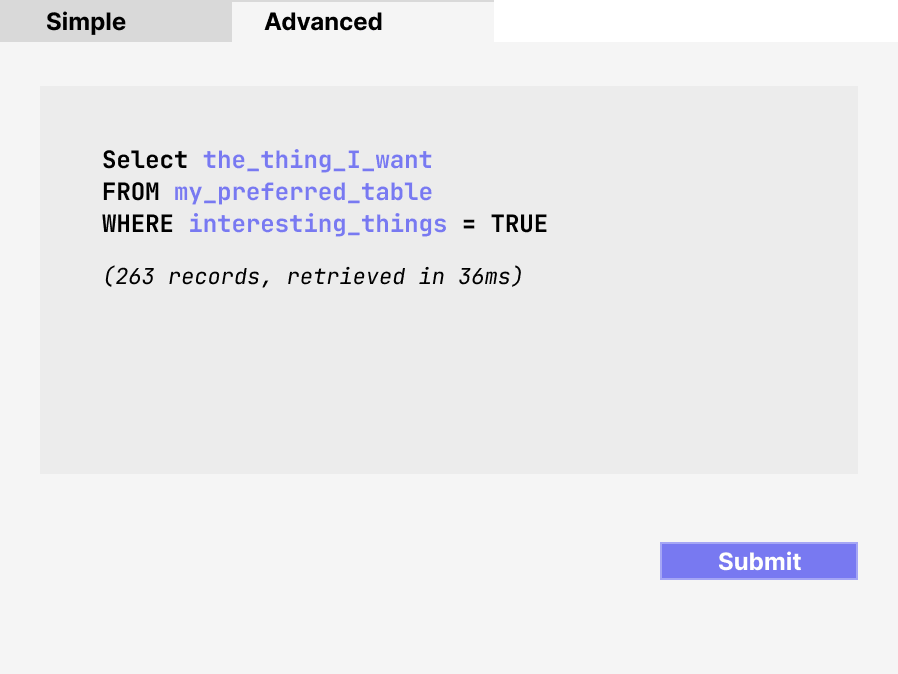
Advanced mode is not a particular feature. It describes anything that looks like a programming tool for a user that wants to get closer to the actual logic used in a program. Advanced mode takes many forms: it might look like a code window where you script Python, a query explorer where you write your own SQL, or another kind of low-level file where you use code structures to implement logic like looping, setting variables, or managing the control flow or information of the software.
Experienced users love complicated features that enable special things. But “happy path” users will probably be confused by advanced mode features. What’s a product manager to do: hide these more complicated features or avoid building them altogether?
Why consider introducing Advanced Mode?

Picture this user interface. You wouldn’t put a student pilot in this cockpit. Yet any instrument-rated and experienced pilot would know exactly what to do with a minimal amount of orientation. A powerful interface enables world-class performance.
The purpose of an “Advanced Mode” feature is to bring the ideas and creativity of programming into the very controlled world of features that we build for the “happy path” user. The allure of advanced mode features is that they let you add the same kind of control you have when you build your own application from scratch. However, adding ways that experienced users can change the intent (or outcomes) of the app makes it important to consider the pros and cons of taking this action.
Here are some reasons to consider adding advanced features to your app. Advanced mode opens up capabilities and also might save you time.
-
With advanced mode, you don’t have to build the edge cases. A clever developer can use logic, code, or snippets they have copied from elsewhere. This means you can spend more time focusing on the usability for basic cases.
-
Advanced mode enables advanced features. For example, a data team might want to use a custom SQL query to duplicate logic they use elsewhere instead of using drop downs to define a data set. An experienced developer will be able to add new functionality to your app.
-
Advanced mode is a speedy way to add partially completed features before you make them easy to use for “happy path” users. Because code or “advanced mode” enables features that don’t exist in the UI, you can test an easter egg feature before rolling it out. If enough people use the complicated solution, take that as a signal to make it easier and bring into the main app.
Advanced mode adds some new stuff and makes it easier for developers to have fun! However, advanced mode features have some drawbacks. Here are some cons to adding advanced functionality:
-
Your support burden is higher. It’s much harder to anticipate what the user is trying to do, and therefore to offer help. Also, if you let users do advanced things, you’re going to need more advanced support users to understand the complexity of what they are doing.
-
Security might be an issue. Offering lower-level access to your application makes it important to harden the application against malicious actors. (Ok, you should have been doing this already, but this is your prompt.)
-
“Advanced Mode” might not be advanced enough. Even though your “advanced mode” feature looks like it delivers exacting control, it might be not a low enough level abstraction to satisfy programmers who are used to controlling everything.
-
You might need “undo”. If inexperienced users stumble upon this feature and don’t know how to use it, you need a way for them to go back to the previous state. One way to do this is to allow them to go back to “simple” mode if they haven’t changed anything and simply navigated to a new area.
Getting Started with Advanced Mode
With these pros and cons in mind, what are some places that make sense to open to more advanced features? One high-value place to introduce such a feature is an area where you calculate data, especially where you define a variable or object used elsewhere in the app. Variable or query definition is a good place to leverage a programmer’s contribution.
For example, in a revenue operations system, metrics like annual recurring revenue (ARR) or customer lifetime value (LTV) need an exact definition but are different in every company. Using a static definition limits variability and enables a happy path outcome and also limits usability and usefulness. Sometimes the only way to capture the definition used by your organization is with code-like logic (or with code).
What’s the takeaway? Adding advanced mode opens your application to be much more flexible while maintaining the existing guardrails you’ve set up. However, it can also introduce pitfalls to your application and may raise your support burden, so consider the addition carefully.